KADMUS LABS

BUILT BY TRADERS, FOR TRADERS.

Trade smarter.
Scale further.

We design, build and ship world-class NinjaTrader add-ons for forward-thinking traders.

THE FLAGSHIPNINJATRADER

Kopia

One trade.
Multiplied

Your trades, across your accounts. A clean, focused trade copier with market and ATM copying, account multipliers and built-in safety controls.

$299 · One-time purchase · No subscription

Buy Kopia — $299

Kopia + Kanvas for $399

One setup. Multiple accounts.
More payouts.

Copy Trades

Copy market and ATM trades from a leader account to follower accounts. Want to be ballsy on your evals? Set individual account multipliers to supercharge your PnL and pass those evals faster (Not sure how to pass an eval? Check out ‘Trading Community’ at the top )

Group Accounts

Managing multiple accounts? Create Profiles in Kopia to organise them into groups and choose which accounts you want to copy trades to in each profile.

Safety Controls

Built with 85 independent safeguards and tested across more than 3,600 trade scenarios, Kopia is engineered to support prop firm compliance.

Familiar WorkspaceLifetime licence

Kanvas

More Trading.
Better View

That familiar online-charting feel, brought home to NinjaTrader. Kanvas puts your charts, watchlist and trading controls in one beautifully organised workspace. All the features, less lag

$199 · One-time purchase · No subscription

Kopia + Kanvas for $399

Multiple Charts.
One Layout

Static Chart Trader

Keep your trading controls in a fixed panel beside your charts. Switch your focus without chasing floating windows around your screen.

Accounts

Keep your accounts close at hand with an integrated Accounts panel, including filtering and sorting to help you find what you need.

Auto Contract Refresh

Keep your futures watchlist current with automatic contract refresh.

Your Watchlist

Build a custom watchlist for Minis, Micros & Nano's. Organise your symbols your way and bring them straight into your selected chart.

Multi-Chart Layouts

Choose from one, two, four, six or eight charts in a single workspace. Save your layouts, choose which chart settings stay in sync, and sync indicators across all charts.

THE FREE ONENO PURCHASE NEEDED

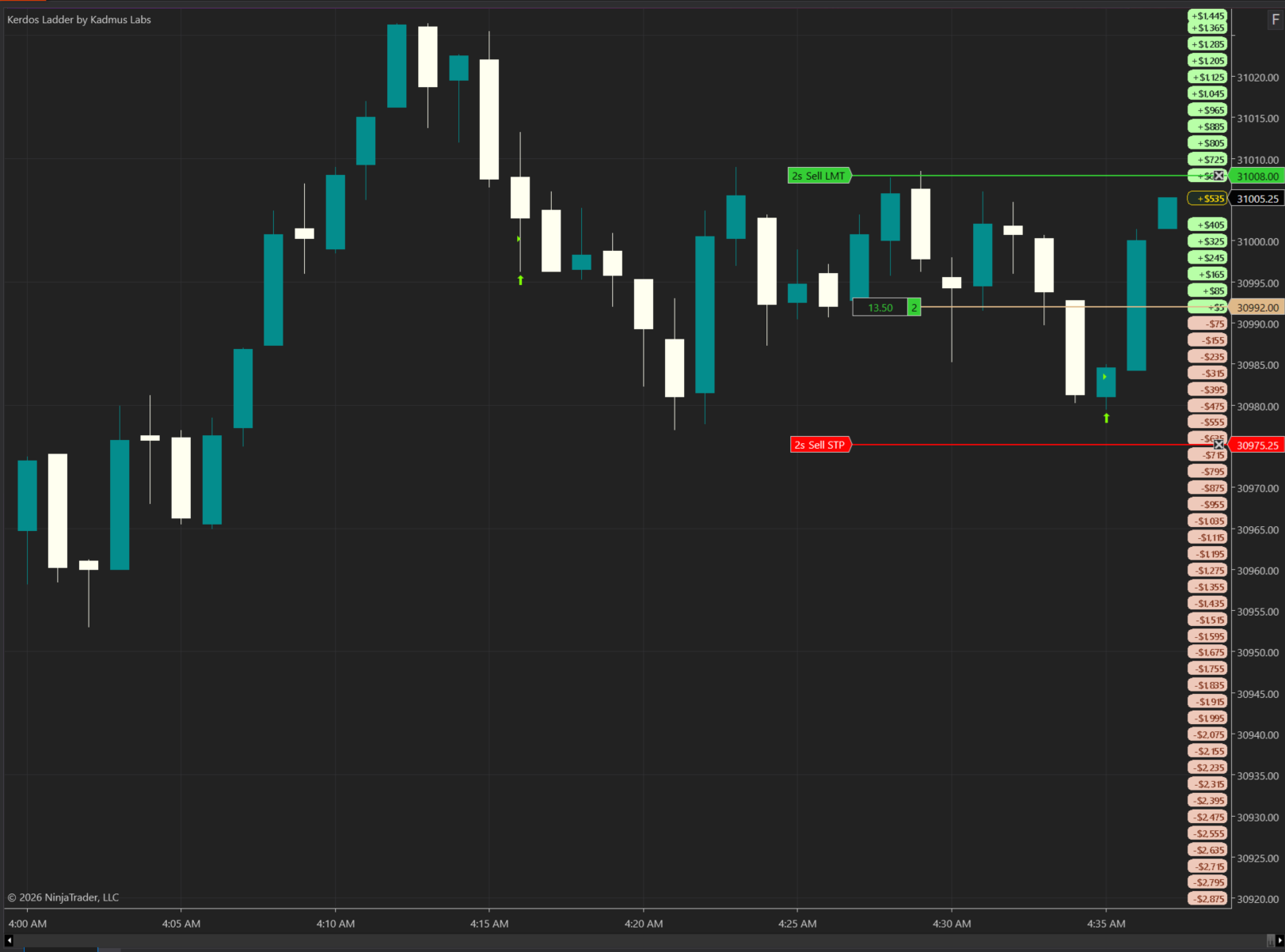
Kerdos Ladder

Your P&L.
Right where you need it.

A clean, customisable P&L ladder for NinjaTrader. Keep account performance in view, without turning your chart into a Christmas tree. Why Kerdos? It's the Greek word for profit - yes, we're nerds

Seeing a Chrome or Windows warning? Watch the guide before installing. Download only from kadmuslabs.com and check the digital signature.

Real-time P&L displayCustomisable appearanceClean, transparent designIt's FREE!!!

Traders × Code ×
Too Much Coffee.

We're a team of traders, quants and developers who got tired of compromising. So we built the tools we wanted to use.

Practical. Focused. A little nerdy.
Fuelled by curiosity and questionable amounts of caffeine.

GOOD PEOPLE. GREAT EDUCATION

Volpro on Skool

Serious about developing your edge? We recommend the Volpro community for its high quality education, daily live trading, weekly member trade reviews and a community that's genuinely helpful.

We're members ourselves, so this recommendation comes from experience.

Explore the Volpro community

Affiliate link: we may earn a commission if you join through this link. If you do join through this link, email your skool username to info@kadmuslabs.com and we'll send you a $100 discount code for Kopia.

KADMUS LABS

Risk disclosure

Kadmus Labs develops software tools for NinjaTrader, including Kopia and Kerdos Ladder. Our software and website content are provided for general informational and trading-support purposes. They do not constitute personal financial or investment advice, a recommendation to trade, or an offer to buy or sell any financial product. You make and remain responsible for your own trading decisions.

Trading futures and other leveraged products involves substantial risk and is not suitable for everyone. Live trading can result in the loss of your entire trading balance and, depending on your account arrangements, losses beyond the funds deposited. Only trade with money you can afford to lose.

Our tools may be used with simulated or live accounts, depending on your setup. Simulated, hypothetical and backtested results do not represent actual trading and may not reflect liquidity, slippage, fees or the pressures of risking real money. Past performance, whether actual or simulated, does not guarantee future results.

Copy trading can replicate losses across multiple accounts. Account multipliers increase exposure and can magnify losses as well as gains. Software, platform, broker or connection failures, delays and differences in order execution can cause missed, duplicated or mismatched trades. Protective orders and built-in safeguards cannot eliminate these risks or guarantee that positions will close at an intended price. Monitor your accounts and test your settings in simulation before using live funds.

Kadmus Labs does not guarantee profits, evaluation passes, funded accounts, payouts or compliance with any prop firm's rules. You are responsible for checking whether your use of our tools is permitted by your broker or prop firm and for following their current requirements. Evaluation fees, account eligibility and payouts are governed by the relevant provider's terms.

References to third-party platforms, prop firms or trading communities do not guarantee their performance or suitability. We may receive a commission from disclosed affiliate links. You are responsible for complying with applicable laws and any tax obligations associated with your trading activity.

KADMUS LABS

Refund policy

We do not offer refunds for change of mind. If you believe Kopia has malfunctioned, contact info@kadmuslabs.com with your purchase details, a description of the issue, and an exported Kopia diagnostic log where available. We may request reasonable supporting information to assess the issue.

For minor faults, we will seek to provide a fix within a reasonable time. Where you are entitled to a refund, replacement or other remedy under applicable consumer law, we will honour that entitlement. Missing or inconclusive logs do not remove those rights.

Trading losses or failed evaluations alone do not establish a software fault or refund entitlement. Nothing in this policy excludes rights or remedies that cannot lawfully be excluded.

KADMUS LABS · FREE DOWNLOAD

Get Kerdos Ladder

Download Kerdos Ladder

Seeing a Chrome or Windows warning? Watch the guide before installing. Download only from kadmuslabs.com and check the digital signature.

Windows installer · Beta 1. Digitally signed by Darren Brylewski, the creator of KADMUS LABS. Kerdos Ladder is free; the optional Kopia and Kanvas products each require their own licence.

1. Install Kerdos Ladder

  1. Use 64-bit Windows and NinjaTrader 8.1.7.2. Open NinjaTrader once to initialise its user-data folder, then close it completely.
  2. Download and run KADMUS-LABS-Setup-Beta1.exe. The installer is self-contained; no extraction or NinjaScript import is needed.
  3. Select Kerdos Ladder. Untick Kanvas and leave Kopia unticked if you only want the free ladder. Deselect any product for which you already have a newer version.
  4. Choose your NinjaTrader user-data folder, normally Documents\NinjaTrader 8 (or its OneDrive location), not Program Files. Complete setup and restart NinjaTrader.

For help, send %LOCALAPPDATA%\KADMUS\Setup\LastSetup.log to support.

2. Add it to your chart

  1. Open a chart, right-click it and select Indicators.
  2. Search for Kerdos, select Kerdos Ladder by Kadmus Labs, then click Add.
  3. Adjust the indicator settings if needed, then click Apply and OK.

Need a hand? Email info@kadmuslabs.com with a screenshot of the issue.

A LITTLE SOMETHING BEFORE YOU GO

A difficult decision between No Kopia and $50 off

BEFORE YOU GO!

Here's $50 off Kopia or Kanvas. Use the coupon code below at checkout. Individual products only; bundles excluded.

FIDDYOFF

KADMUS LABS · QUICK GUIDE

Download & install

Chrome or Windows may display a download or app warning. Check that the file came from kadmuslabs.com and its digital signature identifies Darren Brylewski, the creator of KADMUS LABS.

Close NinjaTrader completely before running setup. Need a hand? info@kadmuslabs.com